
About this game
Game Introduction
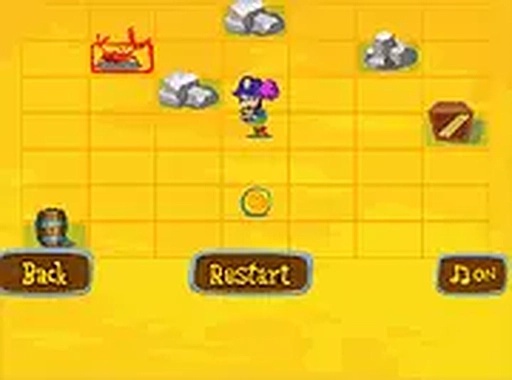
Blackbeard Island Treasure Quest is a family-friendly strategy puzzle game where players guide a character named Blackbeard across sandy beaches and tricky paths. The core objective is to collect treasure scattered across each level while avoiding obstacles. The game emphasizes careful planning and thoughtful decision-making, as each new level introduces different layouts and challenges. Designed to be safe and enjoyable for players of all ages, this game runs directly in the browser with no downloads required. It works on both desktop and mobile devices, and a full screen mode is available for a more immersive experience. The combination of simple controls and gradually increasing difficulty makes it suitable for quick breaks or longer play sessions. The treasure hunt theme provides a rewarding sense of accomplishment as players successfully navigate each area.
How to Play
Players typically use arrow keys on a keyboard or on-screen controls to move Blackbeard across the beaches. The goal is to collect all treasure in each level while avoiding obstacles and choosing the correct path. Each level presents new arrangements of treasure and obstacles, so players must think carefully before moving. The game is easy to learn but offers enough challenge to keep players engaged. It can be played on a phone or computer anytime, anywhere.
Game Features
Game features include a family-friendly pirate theme with simple controls. A full screen mode is available for a more immersive experience. The game is free to play with no downloads required. It works on both desktop and mobile devices. Each level offers new obstacle and treasure layouts, providing variety and replay value.
Tips for Success
Take a moment to observe the entire level before making your first move. Planning your route in advance helps avoid obstacles and ensures you collect all treasure. Practice regularly to become familiar with common obstacle patterns. Patience and careful thinking are more valuable than speed in this type of game.




Audience comments
Sign in to comment
You must be logged in before posting a review or rating.
No account? Create one
No comments yet. Be the first to comment!