Arcbreaker Brick Breaker Arcade
Reviews
Arcbreaker captures the essence of classic brick breaker games with responsive controls and clear visuals. Each level feels fresh with different brick arrangements, and the high score tracking motivates you to improve. The game runs smoothly on desktop browsers, and the full screen option enhances immersion. It is a reliable choice for casual gaming breaks without any complexity. The simple mechanics make it accessible, while the scoring system provides depth for repeated play. Overall, a well-executed arcade game that respects its roots.
Description
Game Introduction
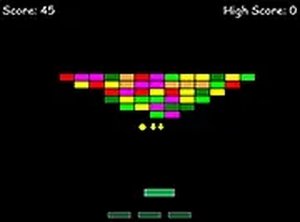
Arcbreaker is an online brick breaker game that brings back the classic arcade experience. The core objective is to clear a wall of colorful bricks using a paddle and ball, reminiscent of traditional arcade machines. This game is designed for desktop play and runs directly in a web browser, offering a nostalgic and accessible gaming session for players of all ages.
How to Play
Players control a paddle at the bottom of the screen to bounce a ball upward, aiming to break bricks arranged in levels. The ball ricochets off the paddle, walls, and bricks, and each brick destroyed adds to the score. The goal is to clear all bricks from the current level to advance. If the ball falls past the paddle, a life is lost, and the game ends when all lives are gone. Controls are typically mouse or keyboard based.
Game Features
Arcbreaker includes classic arcade-style graphics and a high score system that encourages replayability. The game is free to play with no download or registration required. It is optimized for desktop browsers and supports full screen mode for an immersive experience. The lightweight design ensures quick loading times.
Tips for Success
Practice your paddle timing and ball aiming to improve accuracy. Focus on clearing bricks strategically to keep the ball in play longer. Use the full screen mode to minimize distractions. Regular practice will help you achieve higher scores and master the game's mechanics.
✅ Compatibility & Testing
Faq
Is Arcbreaker free to play?
Yes, Arcbreaker is free to play. There are no hidden costs or in-app purchases required to enjoy the full game. You can start playing immediately in your browser without any payment.
Do I need to download anything to play Arcbreaker?
No download is necessary. Arcbreaker runs directly in your web browser, so you can start playing instantly without installing any software. Just ensure you have a stable internet connection and a modern browser.
Can I play Arcbreaker on my mobile device?
Arcbreaker is optimized for desktop play, as indicated by its design. While it may function on some mobile browsers, the controls and layout are best suited for a computer with a mouse or keyboard for an optimal experience.
What happens when I clear all bricks in a level?
When you clear all bricks in a level, you advance to the next level. Each new level typically presents a different arrangement of bricks, increasing the challenge. The game continues until you run out of lives.
How can I track my progress in Arcbreaker?
Arcbreaker includes a high score system that records your best scores. After each game, your score is displayed, and you can try to beat it in future sessions. This adds replay value as you strive to improve.
Is Arcbreaker suitable for children?
Yes, Arcbreaker is a family-friendly game with no violent or inappropriate content. Its simple mechanics and colorful visuals make it suitable for players of all ages, including children.