
About this game
Game Introduction
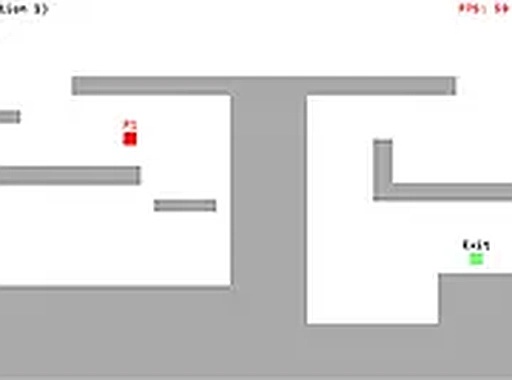
Retro 2D Platformer Journey is a classic arcade-style platformer that brings back the charm of old-school 2D jumping games. Players control a simple block character through a series of levels, each designed to test timing and precision. The main goal is straightforward: move from the starting point to the exit door without falling into gaps or getting stuck on obstacles. The game focuses on pure platforming action, with clean visuals that keep distractions to a minimum. It is completely free to play directly in a web browser, with no downloads or sign-ups required. This makes it a great choice for quick gaming sessions or for anyone who enjoys retro-style challenges. The increasing difficulty ensures that players stay engaged as they progress, while the lack of timers or enemies allows for a relaxed pace.
How to Play
Players control their character using keyboard inputs. Typical controls involve using the arrow keys or WASD to move left and right, and the up arrow or spacebar to jump. The character automatically stops at edges, requiring careful timing to cross gaps and land on platforms. The exit door is clearly marked at the end of each level; touching it completes the level and unlocks the next one. There are no timers or enemies, so players can take their time to plan each move. The game is designed for desktop browsers, ensuring responsive controls and a smooth experience. Full screen mode can be toggled for a larger view.
Game Features
Classic 2D platforming mechanics with simple keyboard controls. Free to play directly in a browser without any downloads or sign-ups. Increasing level difficulty that rewards precision and timing. Clean, distraction-free visual design that focuses on pure gameplay. Full screen mode for an immersive experience. The game is designed for desktop browsers, ensuring smooth performance and responsive controls. The lack of timers or pressure allows players to focus on improving their skills at their own pace.
Tips for Success
Practice each level to improve accuracy and timing. Since there are no timers or enemies, take time to study each gap and platform before making a move. Focus on mastering jump timing, as precise jumps are key to crossing gaps successfully. Use full screen mode to reduce distractions and see the level layout more clearly. If stuck on a level, try observing the pattern of platforms and gaps to plan a route. Consistent practice will help progress through the increasingly challenging levels.


Audience comments
Sign in to comment
You must be logged in before posting a review or rating.
No account? Create one
No comments yet. Be the first to comment!