Flappy Parrot Word Builder
Reviews
Flappy Parrot with Create Words turns the familiar flappy bird concept into a spelling exercise. The need to identify and collect specific letters adds a layer of focus that makes each attempt feel meaningful. The difficulty ramps up gradually, and the bright art style keeps the experience light. It is easy to pick up for a few minutes, and the word-building aspect gives it more depth than a typical arcade game. A solid choice for casual players and young learners alike.
Description
Game Introduction
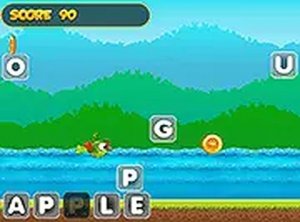
Flappy Parrot Word Builder is an arcade-style game that combines classic flying mechanics with a word-building challenge. Players control a colorful parrot navigating through a sky filled with floating letters. The objective is to collect only the letters that belong to a target word shown on the screen while avoiding all others. This design transforms a simple flying game into a spelling test that exercises both reflexes and vocabulary. The bright visuals and responsive controls make it accessible for younger players, while the increasing difficulty keeps older players engaged. It is a safe, family-friendly game that works on both desktop and mobile browsers without any downloads.
How to Play
Players tap or click the screen to make the parrot flap upward. The goal is to navigate through a series of obstacles and collect the correct letters to spell the word shown at the bottom left. Letters float in the air as you progress. Touching or clicking on a letter that matches one in the target word collects it. Any letter that is not part of the word ends the game if touched. Colliding with an obstacle also ends the run. The game supports full screen mode for a more immersive experience. Controls are simple enough for young children to understand, yet the precision needed to collect the right letters offers a satisfying challenge for adults.
Game Features
Word-building gameplay that combines flying action with spelling practice. A cute parrot character with smooth animations. Simple tap or click controls that work on touchscreens and mice. Full screen mode for focused play. Increasing difficulty as players progress through words. Family-safe content with no violence or inappropriate themes. No downloads or installations required.
Tips for Success
Practice timing your taps to maintain a steady flight path. Focus on the target word before each letter appears to quickly decide if it is correct. Avoid rushing; it is better to wait for the right letter than to risk touching a wrong one. Learn the pattern of obstacles to anticipate gaps. Regular practice will improve both your spelling speed and flying accuracy.
Compatibility
This H5 game runs smoothly on: • Desktop computers (Windows / Mac) • Mobile phones (iPhone / Android) • Tablets (iPad / Android) 🌐 Best experienced with Chrome, Safari, or Edge
Faq
Is this game free to play?
Yes, the game is typically free to play in a web browser. No downloads or installations are required. It may include optional ads to support development, but the core experience is accessible without any payment.
Can I play this game on my phone?
Yes, the game is designed to work on both desktop and mobile browsers. The simple tap controls are optimized for touchscreens, so you can play on smartphones and tablets without any issues.
What happens when I complete a word?
When you successfully collect all the letters of the target word, you progress to the next word. The game may increase in difficulty with each completed word, offering a sense of achievement and encouraging you to keep playing.
Is this game suitable for young children?
Yes, the game is family-friendly with no violence or inappropriate themes. The bright visuals and simple controls make it accessible for young children, while the spelling aspect can help with early reading and vocabulary development.
Do I need an internet connection to play?
Since the game runs in a web browser, an internet connection is typically required to load the game initially. Once loaded, some parts may work offline, but a stable connection is recommended for the best experience.
Are there different difficulty levels?
The game may include increasing difficulty as you progress through words, but specific difficulty settings are not confirmed. The challenge comes from faster obstacles and more complex words as you advance.