
About this game
Game Introduction
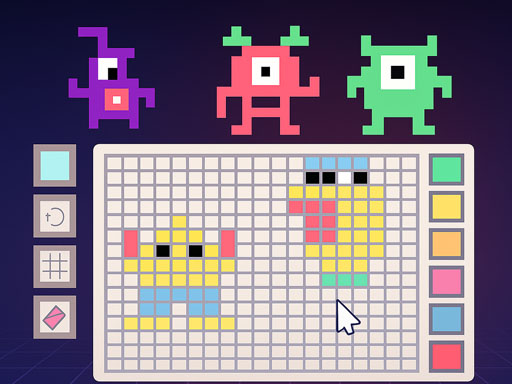
Pixel Art Creator Online is a free browser-based drawing game that focuses on creative expression through pixel art. Unlike many art games that provide pre-made templates or guided projects, this game offers a completely blank canvas—a grid of squares waiting for your personal touch. The core idea is simple: you choose colors from a palette and fill in individual grid cells to build your own picture, one pixel at a time. This approach makes the game accessible to everyone, from young children exploring colors to adults seeking a relaxing creative outlet. There are no objectives to complete, no scores to beat, and no time pressure. The only goal is to enjoy the process of making something unique. Once your artwork is finished, you can save it directly to your device and share it with others through social media or messaging apps. This game is ideal for anyone who enjoys art, wants to try a new hobby, or simply needs a calm, screen-based activity that encourages mindfulness and creativity. The open-ended nature means every session can produce something different, and there is no right or wrong way to play.
How to Play
To begin, open the game in your web browser. You will see a large grid of small squares and a color palette on the side. Select a color by clicking on it, then click on any square in the grid to fill it with that color. You can switch colors at any time to add variety to your design. There are no instructions to follow or levels to complete—just create whatever you like. Many players start with simple shapes like hearts, stars, or letters, then move on to more detailed pictures. The controls are intuitive and responsive, making it easy for anyone to start drawing immediately. When you are satisfied with your creation, use the save button to download the image to your device. From there, you can share it on social media, send it to friends, or keep it as a personal keepsake.
Game Features
Pixel Art Creator Online is completely free to play with no hidden costs. It provides a blank grid and a full color palette, giving you unlimited creative freedom. There are no templates, preset designs, or time limits, so you can work at your own pace. The game is designed to be relaxing and stress-free, suitable for all ages. You can save your finished artwork directly to your device and share it easily with others. The interface is simple and user-friendly, requiring no prior drawing experience. The game runs smoothly in most modern browsers without any downloads or installations.
Tips for Success
Start with small, simple designs to get comfortable with the controls. Experiment with different color combinations to make your art more vibrant. Take breaks if you feel stuck—sometimes stepping away helps you see new possibilities. Save your work periodically to avoid losing progress. Look at other pixel art online for inspiration, but always create your own original pieces. Most importantly, enjoy the process and don't worry about making mistakes.



Audience comments
Sign in to comment
You must be logged in before posting a review or rating.
No account? Create one
No comments yet. Be the first to comment!