Spring Princess Dress Up Game
Reviews
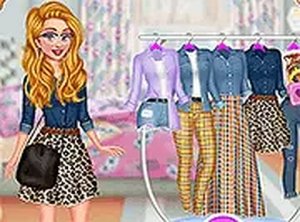
Princesses Spring Days Fashionistas offers a calm and creative dress up experience. The game has a good variety of clothing and accessories. Players can mix and match freely without time limits. This makes it ideal for children and adults who enjoy fashion. The interface is clean and easy to use on any device. The full-screen mode adds to the immersion. It is a fun way to spend a few minutes or longer. The game encourages creativity and personal style choices.
Description
Game Introduction
Spring is here, and it is time to refresh the wardrobe. In Princesses Spring Days Fashionistas Dress Up Game, the princesses have been planning their spring looks since fall. Now they need to decide which clothes stay and which go. As a trendsetter, you will see surprising clothing pieces for the new season. This free online game runs directly in your browser. No downloads are needed. You can play on mobile devices or desktop computers. The game also offers a full-screen mode for a more immersive experience. Explore creative fashion choices and have fun styling the princesses for spring.
How to Play
Playing Princesses Spring Days Fashionistas Dress Up Game is simple. Use your mouse or touch screen to select clothing items and accessories. Start by choosing tops, bottoms, dresses, and shoes. Mix and match to create unique spring looks. Add fun accessories like hats, bags, and jewelry to complete the outfit. The game lets you experiment with different styles until you find the perfect combination. There are no time limits or scores, so you can take your time. Just click or tap on items to try them. It is easy to undo choices and try new ones. This makes for a stress-free fashion experience for all ages.
Game Features
This game is free to play. It requires no downloads or installations. It works on both mobile devices and desktop computers. A full-screen mode is available for a more focused experience. The game has a simple interface that is easy to navigate. You can change outfits as many times as you like. There are no ads that interrupt gameplay.
Tips for Success
You will enjoy the creative freedom this game offers. It is a relaxing way to explore fashion without pressure. The game is suitable for all ages and helps develop a sense of style. It is perfect for a quick break or a longer creative session.
✅ Compatibility & Testing
All games on this site are manually tested on: • Desktop (Windows 11, macOS Ventura) • Mobile (iPhone 14, Samsung Galaxy S23) • Tablet (iPad Pro, Android tablet) 📌 Supported browsers: Chrome, Safari, Edge, Firefox (latest versions) 📌 Not supported: Internet Explorer, older browser versions
Faq
Is this game suitable for young children?
Yes, this game is designed to be family-friendly and suitable for all ages. There are no time limits or scores, making it a stress-free experience. The simple interface and touch controls are easy for young children to use, and the content is entirely about creative fashion styling.
Do I need to create an account to play?
No account creation is necessary. The game runs directly in your browser without any sign-up or login requirements. You can start playing immediately by visiting the game page. This makes it convenient for quick play sessions without any commitment.
Can I save my outfits?
The game description does not specify a save feature. Typically, browser-based dress-up games may allow you to take a screenshot of your creation using your device's built-in screenshot function, but there is no in-game save option mentioned. You can always recreate outfits by remembering your combinations.
Are there any in-app purchases or hidden costs?
No, the game is completely free to play with no in-app purchases or hidden costs. There are no ads that interrupt gameplay, and all clothing items and accessories are available without any payment. You can enjoy the full experience without spending any money.
How do I access full-screen mode?
Full-screen mode is typically activated by clicking a button on the game interface, often represented by a full-screen icon. The exact method may vary depending on the platform, but it is usually a simple click or tap. This mode provides a more immersive experience by hiding browser elements.
What if I make a mistake while dressing up?
You can easily undo any choice by clicking or tapping on the selected item again to remove it, or by choosing a different item. The game allows you to experiment freely without penalties, so you can try as many combinations as you like until you are satisfied with the look.
Games You Might Enjoy
Centaur Princesses Dress Up Game
Island Princess Memory Card Puzzle Game
Futuristic Fashion Dress Up
Malibu Vibes: Princess On Vacation Dress Up Game - Fashion Game
Grunge Fashion Dress Up
Princesses Fashion Styles To Try Online Dress Up Game
Dotted Girl Dress Up Fashion Game
Color Me Princess Online Coloring Game - Coloring Game
DIY Princesses Face Mask Dress Up Game - Dress Up Game