Ruby Quest Puzzle Game
Reviews
Ruby Quest is a well-designed memory puzzle that gradually increases in difficulty. The gem-flipping mechanic is simple to learn but keeps you thinking. Levels are short enough for quick sessions but challenging enough to hold your attention. It is a reliable choice for anyone who enjoys brain teasers and wants to improve focus.
Description
Game Introduction
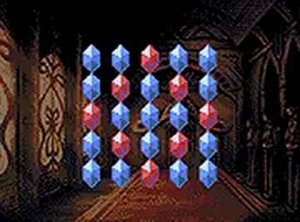
Ruby Quest Puzzle Game is an engaging online puzzle experience that challenges your memory and logic. The core objective is simple: flip gems to reveal their colors and match pairs of similar gems. As you progress, the puzzles become more complex, testing your cognitive skills and patience. This game is perfect for players who enjoy brain-teasing challenges and want to improve their memory and concentration. Ruby Quest is free to play directly in your browser with no downloads required, and for the best experience, it is recommended to play on a desktop computer using a keyboard or mouse.
How to Play
To play Ruby Quest, use your mouse to click on gems to flip them. Each flip reveals the gem's color. Your goal is to find pairs of matching gems by remembering their positions. When you flip two matching gems, they stay revealed. If they don't match, they flip back, and you must try again. The game gets trickier as levels progress, with more gems and fewer hints. Plan your moves carefully to avoid confusion and complete each puzzle. Ruby Quest is designed for desktop play, so using a mouse or keyboard provides precise control. Enjoy the challenge and see how many levels you can conquer.
Game Features
Ruby Quest offers fun gem-matching puzzle gameplay with increasing difficulty. It features clean graphics and smooth animations that enhance the experience. The game includes a full-screen mode for an immersive puzzle-solving adventure. It is free to play with no downloads required, and works on desktop browsers with mouse or keyboard input. The gradual difficulty curve keeps the game engaging without being overwhelming, making it suitable for both short breaks and longer play sessions.
Tips for Success
To succeed in Ruby Quest, practice regularly to improve your memory and pattern recognition. Start by memorizing the positions of a few gems at a time rather than trying to remember everything at once. Take your time with each move—rushing often leads to mistakes. As the levels become more challenging, try to develop a systematic approach, such as flipping gems in a consistent order. Finally, stay patient and focused; each completed puzzle is a rewarding mental achievement.
Compatibility
Faq
Is Ruby Quest Puzzle Game free to play?
Yes, Ruby Quest Puzzle Game is free to play directly in your browser. There are no downloads or purchases required to enjoy the full game.
Can I play Ruby Quest on my mobile phone?
Ruby Quest is designed primarily for desktop play using a keyboard or mouse. While it may work on some mobile browsers, the experience is optimized for larger screens and precise input.
Does Ruby Quest have a time limit?
The game does not specify a time limit. Typically, puzzle games of this type allow you to take as much time as you need to think through each move, making it a relaxing experience.
How many levels are there in Ruby Quest?
The exact number of levels is not specified, but the game features increasing difficulty as you progress. Players can expect a series of puzzles that gradually become more challenging.
Can I save my progress in Ruby Quest?
Since Ruby Quest is a browser-based game, progress may be saved automatically in your browser's local storage. However, clearing your browser data could reset your progress.
Is Ruby Quest suitable for children?
Yes, Ruby Quest is a family-friendly puzzle game that helps improve memory and logic skills. It contains no violent or inappropriate content, making it suitable for players of all ages.