Pixel Art Color Puzzle Game
Reviews
Pixel Art Color delivers a satisfying puzzle experience with thousands of unique images. The number matching is intuitive, and the gradual reveal of each picture keeps you engaged. It is perfect for relaxing after work or during downtime. The game offers high replayability due to its large content library and no time limits. A solid choice for fans of casual puzzles.
Description
Game Introduction
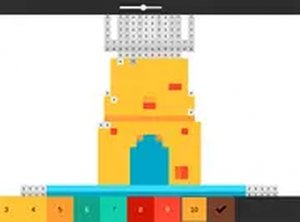
Pixel Art Color Online Puzzle Game is a relaxing puzzle experience that combines coloring with number-based logic. Each image is divided into numbered squares, or pixels. Your goal is to select the correct color from a palette and fill in all sections that share that number. As you progress, a hidden picture gradually appears, rewarding patience and attention. The game offers thousands of designs, from animals and landscapes to fantasy scenes, ensuring fresh content every time you play. It is designed to be simple enough for beginners yet satisfying for experienced puzzle fans. The gentle pace and clear visual feedback make it an excellent choice for unwinding after a busy day.
How to Play
To play Pixel Art Color, start by choosing an image from the gallery. The pixel grid will display numbered cells. Look at the color palette on the side of the screen. Each color swatch has a number that matches certain cells. Click a color to select it, then click any cell with that number. The cell will fill instantly. Continue matching numbers until the entire grid is colored. You can zoom in using the mouse wheel for precise filling, or switch to full screen mode for a larger view. There is no time limit, so you can work at your own pace. The game automatically saves your progress, allowing you to return later and finish your artwork.
Game Features
Features include a vast library of pixel art images updated regularly. The interface is clean and intuitive, with smooth zoom and pan controls. Full screen mode provides an immersive experience. The game works well on desktop browsers and requires no downloads. Each completed picture can be saved or shared with friends.
Tips for Success
You will enjoy Pixel Art Color because it offers a peaceful way to express creativity without pressure. The simple number matching mechanic is easy to learn, and the gradual reveal of each image provides a sense of accomplishment. It is a perfect activity for relaxation or short breaks.
❓ Having issues?
✅ This game supports: - Desktop browsers (Chrome, Edge, Safari) - Mobile browsers (Chrome on Android, Safari on iOS) ❌ Does NOT support: - Internet Explorer - Very old browser versions 👉 Try refreshing or updating your browser
Faq
Can I play Pixel Art Color on my mobile device?
The game is designed to work well on desktop browsers. While it may also function on mobile browsers, the zoom and pan controls are optimized for mouse and keyboard use. For the best experience, we recommend playing on a desktop or laptop computer.
Is there any cost to play Pixel Art Color?
The game is available to play online for free. Some games of this type may offer optional in-game purchases for additional image packs or features, but the core puzzle experience is typically free to enjoy without any payment.
How often are new images added to the gallery?
The game features a library that is updated regularly with fresh pixel art designs. The exact frequency of updates may vary, but new content is added periodically to keep the experience engaging and provide players with a steady stream of new puzzles.
Can I share my completed artwork with friends?
Yes, the game allows you to save or share each completed picture. You can share your finished pixel art directly from the game interface, making it easy to show off your creations on social media or send them to friends and family.
Does the game have any time limits or pressure?
No, Pixel Art Color is designed to be a relaxing experience with no time limits. You can color at your own pace, take breaks whenever you like, and return to your work later. The game automatically saves your progress so you never lose your place.
What happens if I make a mistake while coloring?
If you fill a cell with the wrong color, you can typically undo or correct it. Many puzzle games of this type include an undo feature or allow you to simply click the correct color to overwrite the mistake. The interface is forgiving and encourages experimentation.
Games You Might Enjoy
Kogama: Cheese Escape Rat Online Game - Adventure Game

All-New Gravoor! Maze Arcade Online Game - Arcade Game
Kogama: Squid Game Parkour Online Arcade Game

Birds Kyodai Online Puzzle Game - Tile Matching Puzzle
The Simpson Flappy Game Online Arcade Game

Bottle Tap Puzzle Game

Balance Stack 3D Puzzle
Snake 3D Block Online Puzzle Game - Arcade Game

Paty Path Runner Arcade Game