Words of Wonders Crossword Puzzle
Reviews
Words of Wonders offers a satisfying mix of crossword puzzles and cultural exploration. The levels are well-paced, and the hints system prevents frustration. Replayability is high due to the variety of themes and the gradual unlocking of landmark images. It is a solid choice for casual players looking for a brain teaser that also teaches something new.
Description
Game Introduction
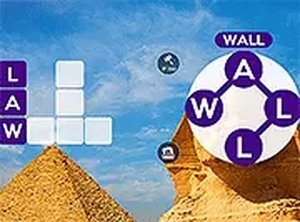
Words of Wonders is a crossword puzzle game that challenges players to form words from a set of letters. The game combines word puzzle solving with a virtual journey through famous landmarks around the world. Each puzzle is associated with a specific wonder, such as the Great Wall of China or the Colosseum, and completing levels unlocks images of these sites. This adds a cultural learning element to the gameplay. The game is designed to be family-friendly and suitable for all ages, offering a relaxing yet stimulating experience. It is free to play and works on both mobile and desktop browsers without requiring any downloads.
How to Play
To play Words of Wonders, start by looking at the set of letters displayed on the screen. Your goal is to connect these letters by swiping or tapping to form words that match the crossword grid. Each level has a theme and a list of words to discover. If you need help, you can use hints to reveal random letters or the hammer power-up to uncover a specific letter of your choice. The game moves you to new levels and new wonders as you complete each puzzle. It is easy to start playing directly in your browser on any device, and you can use full screen mode for a more immersive experience.
Game Features
Words of Wonders offers over 500 levels with increasing difficulty. Players collect images of world wonders as they solve puzzles. The game includes hints and power-ups to assist when stuck. It is playable on mobile and desktop devices without downloads. The game is completely free to play, making it accessible to everyone.
Tips for Success
To succeed in Words of Wonders, start by identifying common prefixes and suffixes in the letter set. Try to form shorter words first to fill the grid and reveal letters for longer words. Use hints and power-ups sparingly, saving them for more challenging levels. Practice regularly to improve your vocabulary and pattern recognition. If stuck, take a break and return with fresh eyes. The game rewards patience and persistence.
Compatibility:
✅ Works on PC & Mobile | Recommended: Chrome / Safari / Edge
Faq
Is Words of Wonders free to play?
Yes, Words of Wonders is completely free to play. There are no upfront costs or subscription fees required. The game may offer optional in-app purchases for hints or power-ups, but the core gameplay is accessible without spending money.
Can I play Words of Wonders offline?
Words of Wonders typically requires an internet connection to load levels and sync progress, as it is a browser-based game. However, some versions may offer limited offline functionality. For the best experience, a stable internet connection is recommended.
Does Words of Wonders work on all devices?
Yes, Words of Wonders is designed to work on both mobile devices and desktop computers. It runs directly in your web browser without requiring any downloads, making it compatible with most modern browsers on iOS, Android, Windows, and Mac.
Are there different difficulty levels in Words of Wonders?
Words of Wonders features over 500 levels with gradually increasing difficulty. The puzzles start simple and become more challenging as you progress, introducing longer words and more complex letter combinations. This ensures a steady learning curve for players of all skill levels.
Can I play Words of Wonders in full screen mode?
Yes, Words of Wonders supports full screen mode for a more immersive experience. This feature is especially useful on desktop browsers, allowing you to focus on the puzzle without distractions. Full screen mode can typically be activated from the game's settings or menu.
Does Words of Wonders save my progress?
Words of Wonders automatically saves your progress as you complete levels. This means you can return to the game at any time and continue from where you left off. Progress is typically saved in your browser's local storage or through an account if you sign in.