Smiles Clicking Reflex Game
Reviews
Smiles is a straightforward arcade game that delivers a satisfying challenge. The simple premise of clicking happy faces while avoiding red ones is easy to learn but requires increasing speed and focus as you play. The game offers good replayability as you try to beat your own high score. It is well-suited for quick gaming sessions and helps improve hand-eye coordination. The clean visuals and responsive controls make it enjoyable for all ages.
Description
Game Introduction
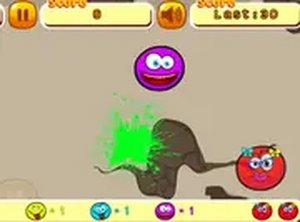
Smiles is a free online arcade game that challenges your speed and focus. The goal is simple: click all the smiles falling down the screen, but be careful to avoid the red ones. Each smile you click adds to your score, but clicking three red smiles ends the game. The smiles fall continuously, so you need to be quick and precise to maximize your points. This game is perfect for quick gaming sessions and tests your reflexes. It runs directly in your browser and is designed for desktop use with a mouse. You can also play in full screen mode for a more immersive experience. Smiles is family-friendly and suitable for all ages, offering a lighthearted challenge that is easy to pick up but hard to master.
How to Play
To play Smiles, use your mouse to click on the smiles as they appear on the screen. The objective is to click all smiles except the red ones. Each smile you click gives you points, but clicking a red smile counts against you. If you click three red smiles, you lose the game. The smiles fall down quickly, so you need to be fast and accurate. Missed smiles do not give points, so try to click as many as possible while avoiding the red ones. The game is simple to understand but requires quick thinking and hand-eye coordination. It is best played on a computer with a mouse for precise clicking. You can start playing instantly without any downloads or registration.
Game Features
Fast-paced clicking action that keeps you on your toes. Avoid red smiles to keep playing. Free to play with no downloads or registration. Designed for desktop use with a mouse. Full screen mode for an immersive experience. Family-friendly and suitable for all ages.
Tips for Success
To improve your score, focus on clicking only the happy smiles and avoid the red ones. Practice your hand-eye coordination to react faster as the smiles fall. Stay calm and don't rush, as accuracy is more important than speed. Try to anticipate the pattern of falling smiles to click more efficiently. Regular short practice sessions can help sharpen your reflexes over time.
Compatibility
💻 Desktop | 📱 Mobile | 📟 Tablet – All supported · Best with Chrome or Safari
Faq
Is Smiles Clicking Game free to play?
Yes, the game is completely free to play. There are no hidden costs, no downloads required, and you don't need to register an account. You can start playing instantly in your browser.
Can I play Smiles on my phone or tablet?
The game is primarily designed for desktop use with a mouse. While it may run on mobile devices, the gameplay is optimized for precise clicking, which is easier with a mouse. For the best experience, play on a computer.
What happens when I click a red smile?
Clicking a red smile counts as a mistake. If you click three red smiles, the game ends immediately. Each red smile you click reduces your chance to keep playing, so it's important to avoid them.
Is there a way to pause the game?
The game description does not specify a pause feature. Typically, in fast-paced arcade games like this, the action is continuous. You may need to play through without pausing, but check the game interface for any pause button.
Can I compete with friends in Smiles?
The game focuses on personal high scores rather than direct multiplayer competition. You can challenge yourself to beat your own best score, and you may share your scores with friends informally to compare performance.
Does the game have sound effects or music?
The game description does not mention audio features. Many online arcade games include sound effects for clicks and feedback, but this is not confirmed. You can play with or without sound as you prefer.